
Month: March 2026

Hardening Perimeter Security: Real-Time Monitoring with the Solar Driveway Alarm

Source:https://i.ytimg.com

You’re deep in the second cycle of REM sleep at 2:00 AM when a faint crunch of gravel echoes from the bottom of your 100-foot driveway. By the time your dog barks or your porch light flickers on, the intruder—or the porch pirate—is already at your front door. In the security world, we call this a “reactive failure.” You’re responding to a threat that has already breached your inner sanctum.

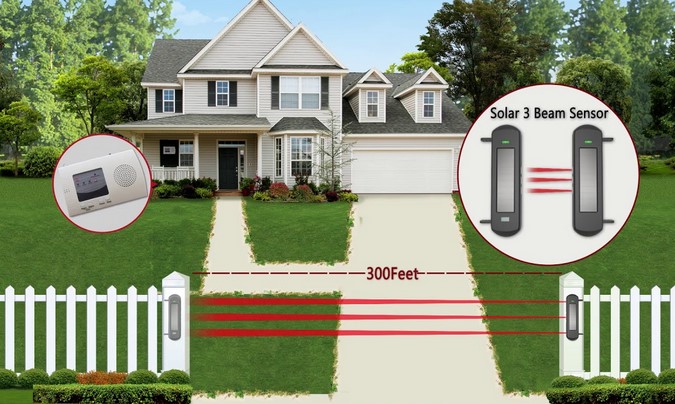
In my decade of hardening home perimeters and installing smart security systems, I’ve learned that the most critical asset isn’t a high-definition camera—it’s time. I once worked with a homeowner who had $5,000 worth of 4K cameras but still lost his catalytic converter because he didn’t know the thieves were on his property until he saw the footage the next morning. That’s why I always recommend a Solar Driveway Alarm as the first line of defense. It turns your perimeter from a passive boundary into an active, real-time lookout.

The First Line of Defense: Understanding Perimeter Hardening

When we talk about “hardening” a perimeter, we’re looking to move the detection point as far away from your front door as possible. Most people focus on the house itself, but professional security starts at the edge of the property.

Think of your home security like an onion. Your front door lock is the core, your window sensors are the middle layers, and the Solar Driveway Alarm is the outer skin. If you can detect a “pressure” on that outer skin, you gain the 30 to 60 seconds of lead time needed to turn on lights, check a monitor, or call the authorities.

Installing a solar-powered system specifically solves the two biggest headaches I’ve faced in the field: wiring logistics and battery anxiety. There is nothing worse than a security device that dies right when you need it because you forgot to change a 9-volt battery in the middle of winter.

How a Solar Driveway Alarm Actually Works

To the casual observer, it’s just a plastic box on a stake. But inside, the tech is quite elegant. Most modern systems utilize Passive Infrared (PIR) sensors. Think of a PIR sensor like a highly sensitive thermal “tripwire.” It isn’t looking for a visual image; it’s looking for a rapid change in temperature across its field of view. When a warm car engine or a human body moves past the sensor, it creates a “heat signature” that triggers the transmitter.

Because it’s a Solar Driveway Alarm, a small photovoltaic panel on the top keeps an internal lithium-ion battery topped off. Even in overcast regions like the Pacific Northwest where I’ve done numerous installs, these panels are efficient enough to keep the sensor running through the night and deep into a week of storms.

Technical Specs: Range, Frequency, and Interference

If you’re moving from a beginner to an intermediate understanding of home security, you need to look at the transmission range and the detection width.

  • Transmission Range: This is the distance between the sensor (at the driveway) and the receiver (in your house). I always tell clients to look for a “rated” range of at least 1/2 mile. Why? Because walls, trees, and metal siding cut that signal strength in half.

  • Detection Width: Most sensors have a “fan” spread of about 30 feet. If your driveway is wider than that, you might need two sensors “cross-firing” to ensure no one slips through a blind spot.

  • FSK + FHSS Technology: These are technical terms for how the signal travels. Frequency Hopping Spread Spectrum (FHSS) ensures that your neighbor’s garage door opener or a passing ham radio signal won’t trigger your alarm.

Installation Insights: A Professional’s Playbook

In my years of practical experience, the difference between a system that works and one that gives 50 false alarms a day is all in the placement. I’ve seen homeowners mount their Solar Driveway Alarm directly facing the road, causing it to go off every time a school bus passes.

Strategic Placement Rules:

  1. The Angle of Attack: Never point your sensor directly at the street. Aim it across your driveway at a 45-degree angle. This ensures the heat source stays in the “detection zone” longer, providing a more reliable trigger.

  2. Height Matters: Mount the sensor about 3 to 4 feet high. This is high enough to avoid most small rabbits and cats, but low enough to catch the heat of a car engine or a human torso.

  3. Solar Orientation: It sounds obvious, but ensure the solar panel faces South (if you’re in the Northern Hemisphere). I’ve had to go back to “failed” installs just to rotate a sensor 180 degrees so it could actually see the sun.

Avoiding the “False Alarm” Fatigue

The biggest enemy of a security system is a homeowner who turns it off because it’s annoying. If your Solar Driveway Alarm chirps every time the wind blows a tree branch, you will eventually ignore the one time it’s actually a person.

Tips Pro: The Sensitivity Secret

Look for a system with adjustable sensitivity levels. During the summer, heat waves reflecting off hot asphalt can sometimes trick PIR sensors. Setting the sensitivity to “Low” during July and “High” during January can keep your system accurate. Also, clear away any tall “switchgrass” or low-hanging branches within 10 feet of the sensor; moving vegetation is the #1 cause of false triggers.

Integrating with Your Existing Smart Home

For the intermediate user, the Solar Driveway Alarm shouldn’t exist in a vacuum. The best setups I’ve designed link the receiver to a broader ecosystem.

Many modern receivers have relay outputs. This allows you to wire the alarm into a smart home hub. Imagine this: the driveway sensor trips, and automatically, your smart outdoor floodlights turn on, and your hallway tablet switches to the front-gate camera feed. You’ve just moved from a “beep” in the night to an automated fortress.

Weatherproofing and Durability Data

Perimeter gear takes a beating. From 100°F sun to sub-zero blizzards, your Solar Driveway Alarm needs an IP65 or IP66 rating. This “Ingress Protection” code tells you exactly how well the unit handles dust and water.

  • IP65: Can handle rain and low-pressure water jets.

  • IP66: Can handle high-pressure heavy seas or powerful jets.

I’ve pulled apart cheap, unrated sensors that were half-filled with rainwater and ant nests. Don’t skimp on the housing quality; your security depends on that seal holding up for years.

Security is a psychological game as much as a technical one. When you have a Solar Driveway Alarm standing guard, you regain the “high ground.” You are no longer surprised by visitors; you are prepared for them. Whether it’s a delivery driver, a neighbor, or something more’s sinister, you have the information before they have the access.

If you’ve been relying solely on a doorbell camera, you’re only seeing the end of the story. It’s time to write the prologue at the edge of your property.

Is your property currently a “blind spot”? I’d love to hear about your specific layout. Do you have a long winding drive or a short suburban one? Drop a comment below and let’s talk about the best sensor configuration to keep your perimeter hardened!

Would you like me to compare specific solar alarm models or explain how to wire a relay output for your smart lighting system?


Protecting Digital Infrastructure: Centralized Power Management with the Surge Protector Tower

Source:https://www.chintglobal.com

It’s 3:00 PM on a stormy Tuesday. You’re deep into a project, your dual monitors are glowing, and your laptop is huming. Suddenly, a crack of thunder shakes the windows, the lights flicker, and—pop—your screen goes black. In that split second, a high-voltage spike has traveled through your home’s wiring, looking for a place to dump its energy. Without the right defense, that “place” is the sensitive motherboard of your $2,000 workstation.

In my ten years of renovating smart homes and setting up professional home offices, I’ve seen more fried electronics than I care to admit. Most people treat power strips as an afterthought, buying the cheapest plastic bar they can find at the grocery store. But as we integrate more “digital infrastructure” into our homes, the way we manage power needs to evolve. That’s where the Surge Protector Tower comes in—it’s not just a multi-plug; it’s a bodyguard for your digital life.

The Anatomy of a Power Spike: Why Your Devices are at Risk

To understand why you need a specialized system, you have to understand the enemy. A power surge is like a flash flood in a plumbing system. Imagine your home’s electrical wires are pipes meant to carry a steady flow of water. A surge is a sudden wall of water that hits with such force it bursts the seals on your faucets (your electronics).

Most people think surges only come from lightning. In reality, about 80% of surges are “internal.” They happen when your AC compressor kicks on or your vacuum cleaner starts up, sending tiny ripples of excess voltage through the circuit. Over time, these “micro-spikes” degrade the delicate components inside your gadgets, leading to what we call “electronic rust.”

I’ve walked into high-end home theaters where the owner complained about a “glitchy” TV, only to find they were using a decade-old power strip with zero remaining protection. The Surge Protector Tower is designed to absorb these shocks before they ever reach your gear.

Vertical Efficiency: Why the Surge Protector Tower Wins

When I’m designing a workspace, real estate is everything. Traditional horizontal power strips are the “sprawl” of the electrical world. They take up too much floor space, and the moment you try to plug in a large “wall wart” adapter, they block three other outlets.

The Surge Protector Tower solves this through vertical integration. By stacking outlets in a skyscraper configuration, it offers several technical advantages:

  • 360-Degree Access: You can plug in bulky transformers from every angle without overlapping.

  • Space Optimization: It occupies the same footprint as a coffee mug while providing up to 12 or 16 outlets.

  • Cable Management: Because the plugs face outward in all directions, cables naturally drape down, preventing the “rat’s nest” of wires that usually collects dust behind a desk.

Decoding the Specs: Joules, Clamping Voltage, and MOVs

If you’re looking to buy a Surge Protector Tower, you need to look past the fancy LED lights and check the technical data. This is where many homeowners get confused.

The Joule Rating

Think of Joules as a bucket of water. The higher the Joule rating, the more “liquid energy” the protector can soak up before the bucket is full and the device is “spent.” For a basic lamp, 1,000 Joules is fine. For a gaming PC or home server, I always tell my clients to look for a Surge Protector Tower with a minimum of 2,500 to 4,000 Joules.

Clamping Voltage

This is the “trigger point.” It’s the voltage level that tells the protector, “Hey, this is too much! Divert the energy to the ground wire!” A lower clamping voltage is actually better because it means the protector reacts sooner. Look for a rating of 330V or 400V.

Metal Oxide Varistors (MOVs)

These are the internal “soldiers” that sacrifice themselves to stop a surge. In a high-quality tower, these MOVs are designed to divert excess heat safely. A common “hidden warning” I give is that MOVs eventually wear out. If your tower doesn’t have an “Adjustable/Protected” indicator light, you’re flying blind.

Centralized Management: USB Integration and Smart Charging

One of the reasons I personally switched my workshop to a Surge Protector Tower system is the integration of Smart USB Ports. We live in a DC (Direct Current) world now—phones, tablets, and even some desk lamps run on USB.

A high-quality tower usually includes built-in IC (Intelligent Circuitry) chips. These chips “talk” to your device to determine exactly how much amperage it needs. This prevents overcharging and overheating, which is the number one killer of smartphone battery health. Instead of having five different charging bricks plugged in, you have one central hub that manages the “digital diet” of all your portable tech.

Safety First: Fire Retardant and Overload Protection

In my years of practical experience, I’ve seen the aftermath of “daisy-chaining”—plugging one power strip into another. Never do this. It creates a massive fire hazard by drawing more current than the wall outlet can handle.

A professional-grade Surge Protector Tower comes with a built-in circuit breaker. If you accidentally plug a space heater and a laser printer into the same tower (a classic rookie mistake), the tower will “trip” and shut down power instantly. This prevents the internal copper wiring from heating up to the point of ignition.

I always look for towers made from ABS + PC fire-retardant materials. In the rare event of a massive catastrophic surge, you want the device to melt, not catch fire.

Tips Pro: The Hidden Lifespan

Most people don’t realize that surge protectors have an expiration date. Every time a small spike is absorbed, the MOVs inside degrade. If your home has experienced a major storm or a transformer blow-out down the street, your Surge Protector Tower has likely done its job and is now just a regular power strip. I recommend replacing your main defense towers every 2 to 3 years to ensure the protection is still active.

Integrating the Tower into Your Home Design

From an aesthetic standpoint, the “tower” look fits perfectly into the modern home office or “command center.” I often tuck them into the corner of a desk or behind a monitor riser. Because they are stable and weighted at the bottom, they don’t flip over when you plug in a heavy cord.

For my clients who are into “smart homes,” I suggest looking for towers that offer individual tier switching. This allows you to cut power to the top four outlets (your monitors and speakers) while keeping the bottom tier (your router and modem) powered on 24/7. It’s a simple way to save on “phantom power” costs without the hassle of unplugging everything every night.

At the end of the day, your home’s digital infrastructure is an investment in your productivity and entertainment. Why protect thousands of dollars in hardware with a five-dollar cord?

Upgrading to a Surge Protector Tower is a small change that offers massive returns in organization, safety, and device longevity. It turns a chaotic mess of wires into a centralized, protected hub.

What does your power setup look like right now? Is it a tangled mess under your desk, or have you moved to a vertical system? If you’ve ever lost a device to a power surge, I’d love to hear your story in the comments—let’s help others avoid the same heartbreak!

Elevating Corporate Curb Appeal: Architectural Integration of the Pivot Front Door

Source:https://camelglass.co.uk

First impressions are formed in seven seconds, but in the world of high-end corporate architecture, that impression is made before a visitor even speaks to a receptionist. Imagine walking up to a headquarters where the entrance isn’t just a barrier, but a five-hundred-pound slab of oak and steel that glides open with the touch of a single finger. It doesn’t swing; it rotates. It doesn’t just open; it performs.

In my decade of consulting on luxury home and office renovations, I’ve seen clients spend thousands on landscaping and lighting, only to settle for a standard “big box” entryway. To me, that’s like wearing a tailored tuxedo with plastic flip-flops. When we talk about a Pivot Front Door, we are talking about the ultimate statement piece in modern curb appeal. It is the architectural equivalent of a firm, confident handshake.

The Mechanics of Elegance: What Makes a Pivot Door Different?

To the uninitiated, a door is a door. But for those of us who live in the details, the Pivot Front Door represents a departure from centuries of traditional carpentry. Unlike a standard door that hangs from side-mounted hinges, a pivot door rotates on a vertical axis.

Think of a standard door like a page in a book, fixed firmly at the spine. A pivot door, by contrast, is more like a spinning top or a luxury turntable. The weight is supported by a heavy-duty pivot box recessed into the floor and a matching header at the top.

Because the weight is distributed vertically rather than pulling horizontally on a frame, we can design doors that are significantly larger, heavier, and more material-rich than anything a traditional hinge could ever support.

Architectural Harmony: Integrating the Pivot Front Door into Your Facade

When I design an entryway for a corporate or high-end residential client, I look for “architectural integration.” This means the door shouldn’t look like it was stuck onto the building; it should look like it was carved out of it.

1. Scale and Proportion

A Pivot Front Door thrives on “oversize” aesthetics. While a standard door is 36 inches wide, a pivot door starts feeling “right” at 48 to 60 inches. I’ve installed units that reach 10 feet in height. This scale communicates authority. If your facade features high ceilings or expansive glass, a small door will look like a mistake. The pivot system allows us to match the grand scale of the building itself.

2. Material Continuity

I often recommend using “cladded” pivot doors. We can use the same stone or metal siding from the exterior walls and apply it directly to the door’s surface. Because the pivot hardware is rated for hundreds (sometimes thousands) of pounds, the door can “disappear” into the wall when closed, creating a seamless, monolithic look that is incredibly popular in contemporary minimalist design.

Technical Deep-Dive: The Hardware and Engineering

For the intermediate enthusiast, the beauty of the Pivot Front Door is in the engineering. If you get the hardware wrong, you don’t have a door—you have a hazard.

  • Self-Closing Mechanisms: High-end systems often include hydraulic dampers. This ensures that even a 400-pound door closes softly and securely, preventing the “bank vault” slam that can rattle windows.

  • Weather Stripping and Sealing: Historically, pivot doors struggled with drafts. Modern systems utilize drop-down seals at the bottom and magnetic gaskets on the sides to ensure your HVAC efficiency isn’t flying out the door.

  • Threshold Management: In a corporate setting, ADA compliance is non-negotiable. We use recessed floor closers that sit flush with the flooring, allowing for a zero-transition entry that is safe for everyone while maintaining that clean architectural line.

Why the Pivot System is a Corporate Game Changer

In the corporate world, curb appeal translates to brand value. A Pivot Front Door suggests that the company inside is forward-thinking, values quality, and pays attention to the details.

  • Longevity: Traditional hinges eventually sag under the weight of heavy solid-core doors. A pivot system, by contrast, gets more stable as it gets heavier because the weight is being pushed directly into the floor.

  • Minimalist Hardware: Because the door stays closed via internal tension and hydraulic systems, we can use massive, vertical pull bars that add to the “verticality” of the building design.

  • Security: Most pivot doors are custom-built with steel-reinforced cores. When locked, they are virtually impossible to kick in or pry open compared to standard wood frames.

Expert Advice: Avoiding the “Pivot Pitfall”

Tips Pro: The Hidden Warning

The biggest mistake beginners make is ignoring the “back-swing.” Because the pivot point is usually offset by 4 to 12 inches from the side of the door, the back edge of the door actually swings inward as the front edge swings outward.

If you have a wall, a piece of furniture, or a light fixture too close to the hinge side, the door will hit it. Always calculate your “clearance zone” on both sides of the axis before you finalize your door width.

Installation Insights: A Professional’s Perspective

I remember a project in downtown Seattle where we were installing a custom copper-clad Pivot Front Door. The contractor hadn’t perfectly leveled the floor slab. In a standard door, you can shim the hinges. In a pivot door, if that floor box is off by even 1/8 of an inch, the entire 8-foot slab will look crooked against the frame.

Key Installation Steps:

  1. Laser Leveling: Use a 360-degree laser to ensure the floor pivot and the top header are perfectly plumb.

  2. Structural Headers: Ensure the ceiling can handle the “top-pin” pressure. Even though the floor carries the weight, the top of the door exerts lateral force.

  3. The “Sweep” Check: Before the floor is finished, do a dry fit to ensure the door clears the floor through its entire arc.

Enhancing Sustainability and Energy Efficiency

Many of my clients ask if a Pivot Front Door is “green.” While large doors naturally lose more heat than small ones, the materials we use today—like thermally broken aluminum frames and insulated wood cores—drastically improve R-values. When you combine these with high-performance glass inserts (Low-E coatings), you can have a grand entrance that doesn’t ruin your energy audit.

Integrating a Pivot Front Door into a corporate or modern residential project is about more than just a way to enter a building; it’s about the transition from the outside world to a curated interior experience. It’s an investment in architectural integrity and a signal of premium quality.

If you are looking to elevate your property’s curb appeal, stop looking at standard catalogs. Think about the physics, the materials, and the statement you want to make.

Are you considering a pivot door for your next project? What material do you think best represents your brand—warm wood, industrial steel, or sleek glass? Share your thoughts or questions about installation challenges below! I’m here to help you navigate the technicalities of your next big entrance.